Updates
Software Updates
Resources
Request Pro/StudioPro Update
Request v2 Update
(GalleryPro, Collections, Studio)
Request Support
Artsystem5 | Pro/StudioPro 3.0.34e | ProFile for iPad and iPhone 2.5.5
Artsystem5 Online (A5)
Updates since 6/1/2020
Please go to www.artsystems.com/a5updates for the latest A5 updates.
Updates 9/25/2019 to 6/1/2020
- Many new and improved features, performance enhancements, and ongoing fixes
Update 9/25/2019
- Implemented multiple Transaction document selection and execution from the Transactions Preview pane, Print button
- Improvements the Artist search in New Work window with a large record set
- Ongoing fixes and performance enhancements
Update 9/23/2019
- Prevented the execution of the Download for CMS and CSV functions with no records displayed
- Ongoing fixes and performance enhancements
Update 9/18/2019
- Improved scrolling in related grids such as Contacts > Activity with large numbers of records
- Ongoing fixes and performance enhancements
Update 9/16/2019
- Improved speed of loading main Spreadsheet for all records in a module and scrolling through records
- Fixed latency after searching for records in a module more than ten times in succession
- Ongoing fixes and performance enhancements
Update 9/9/2019
- Added ‘Inactive’ and ‘Active’ to Works > Status main selection list
- Added the ability to display, use, and modify a current Spreadsheet layout when creating a new Custom Layout
- Ongoing fixes and performance enhancements
Update 8/21/2019
- Ongoing fixes and performance enhancements
Update 8/6/2019
- Increased speed of loading and display of Transactions and Works Details
- Implemented the ability to Convert Transactions that have been accessed (looked-up) from the Works or Contacts Detail Activity tab
- Added Export options under Share for the Works and Contacts CSV download, and the ability to define each layout individually
- Corrected the immediate refresh of the Works spreadsheet records to reflect changes made to Works in Transactions
- Corrected the immediate refresh of the Works Activity and Contacts Detail Activity and Financials tabs to reflect changes made to Works in Transactions
- Ongoing fixes and performance enhancements
Previously:
- Initial Release
- Ongoing fixes and performance enhancements
Pro/StudioPro 3.0.34e:
- Fixed Document and Report saving and opening on Mac OS to be compatible with Word for Mac 2016 v16
- Updated Multiple Currency refresh from web to utilize exchange-rates.org
- Many other fixes
Pro/StudioPro 3.0.34d:
- NEW: Changed New Work and ReAcquire ‘Purchased’ option label to ’Owned’ and the Works Financial tab to ‘Source’ instead of ‘Purchased From’ for Owned Works.
- Many fixes and performance enhancements
Pro/StudioPro 3.0.34c:
- NEW: Added ability to link to a URL typed into the Works Photo tab Location column with use of the “?” lookup button.
- NEW: Added ability to assign obsolete currencies such as French Franc, German Mark, Belgian Franc, Dutch Gilder and Italian Lira not available in Mac and Windows operating systems to Works, Editions and Transactions.
- NEW: ‘Active’ check column to the Edit Related Lists > Currency list to limit the selections in all Currency drop-downs to only those Currency codes designated as Active. All existing currencies in the Currency List will be automatically marked as Active upon database upgrade except obsolete currencies (#1 above). The user can then choose to add or remove active currencies from Edit Related Lists > Currency list.
- NEW: Added ‘attach document’ button to the Open Document window for all modules providing the manual attachment of multiple files with a single dialog.
- NEW: Added the Works Profit field to the Works Export
- Corrected the the temporary inability to Refresh Currency Rates from the web and changed rates to be up to the minute through XE.com.
- NEW: Added a prompt to warn users of “items of mixed currency” on Transaction and Transaction Detail reports with Non-home and Alt. Currency Tracking options disabled.
- Revised 23 standard Reports for spacing issues.
- NEW: Created new Works report for Artist List providing an itemized list of Artists contained in any set of Works displayed in the spreadsheet.
- Many additional fixes and enhancements
Pro/StudioPro 3.0.33g:
- NEW: Added Category selections to the References module Exhibition type and formats without browsing, and also for easily accessing these files when required in other tasks.
- NEW: Implemented a new “Execute Search” button on all Contact and Artist key-press searches on Windows OS, for example when adding a New Work or Transaction, to facilitate searching with right-to-left text locales such as Hebrew and Arabic if enabled in the Windows OS regional settings.
- NEW: Added additional “Alternate Currency” Transaction total columns to the ‘Complete’ Transaction spreadsheet layout.
- NEW: Added the ‘Sold-To Email’ field to Works Reporting and Export object
- Revised and improved line and spacing issues with 12 standard reports.
- Many additional fixes and enhancements
Pro/StudioPro 3.0.32e:
- NEW: Implemented feature to organize Documents and other files added to the Documents folder associated with individual Works into distinct work subfolders within a folder designated for the Artist Contact record. This allows for directly adding associated files to the emailing of works without browsing, and also for easily accessing these files when required in other tasks.
- NEW: Added new App Preference to disable the ‘auto-complete’ of Work and Edition Titles when typed. When upgrading a database to 3.0.32, the option is checked by default to retain the original functionality, but can be unchecked to Disable.
- NEW: Added the ability to print multiple copies of labels with the addition of a ‘Number of Copies’ entry field on the Run Report window for labels only.
- NEW: Added the “Shipment” Reference Number to the Transactions Complete layout to allow for Searching. It is simply titled ‘Reference Number’.
- NEW: Added the ability to Search by the Work’s Current Owner Credit Line on the Provenance tab, as well as the Credit Line in the Works Provenance detail line-items.
- Dozens of additional fixes and enhancements
Pro/StudioPro 3.0.31e:
- Implemented feature to Archive and View Archives of the Change History
- Added notation to the Change History for Work’s Location changes resulting from the Shipment of Transactions, also visible in the Works Activity
- Added a ‘Consignor VAT’ option in application Preferences and fields on the Works Detail, VAT tab to allow entry of an amount to be separated from the ‘Calculated Net’ while retaining the adjustment in the ‘Net Due Consignor’ for a Registered Consignor with VAT enabled
- Added the ability to drag the Primary Image into the Secondary Images grid (instead of deleting)
- Added ‘Contact Notes’ to the Search field list and ‘Contact Label’ to the Find field list for Contacts
- Updated 37 standard report templates
- Dozens of additional fixes and enhancements
Pro/StudioPro 3.0.29i:
- Added new functionality on the Works Condition tab, adding a ‘disclosure triangle’ to expand the size of the Works Condition notes field to the full size of the tab while open, and expanding the text entry limit to three times the current size
- Fixed Currency-rate ‘Refresh from Web’ functionality due to a change on the Reuters site
- Added new functionality for Works Photography Location and Photographer columns to allow mixed-lookup and typed-entry columns
- Expanded the length of the Works Media field to 1,000 characters
- Restored the ability to attach and view Images residing in sub-folders within the Artsystems-designated image folder
- Added a message to Transactions Reporting with ‘Non-home Currency’ or ‘Alternate Currency’ enabled, informing the user that line-items of mixed currency types may appear and recommending setting a View Set query for individual currencies
- Added new Reporting objects and functionality for the ‘Gallery Base Cost’ calculations as well as Works ‘Original Cost’ and ‘Original Net’ amounts with the selected currency formatting
- Revised 25 standard report layouts
- Additional fixes and enhancements
Pro/StudioPro 3.0.28z19m:
The series of recent incremental updates include many improvements since the initial 3.0.28 release of 2015. Highlights include:
- Improved performance of scrolling in Spreadsheet with trackpad or mouse wheel
- Added onboard link to online user guide and help form (File > Help)
- Added the Primary Image column ‘File Name’ to the Works and Editions Spreadsheet ‘Complete’ Layout
- Added the Primary Image thumbnail picture to the Editions Spreadsheet
- Improved the layout of Spreadsheet with Images report
- Improved the performance of Financial Reports for large databases
- Added new ‘Starting Label number’ to ‘Run Report’ window in order to begin printing Label data at the desired label
- Implemented ability to configure Send Email settings for ‘Secure’ Email providers such as Google/Gmail.
- Implemented the ability to attach email (.eml) files to a Contact’s Document list when Sending an Email in a Contact or Transaction detail window, as well as the ability to open the attached email document in Outlook on Windows OS.
- Implemented the ability to ‘Select Marked Contacts’ when choosing the To:, CC: or BCC: email address selection when Sending an Email.
- Implemented Image ‘Attach’, ‘Remove’ and ‘Rotate’ (90, 180 and 270 degrees) functionality from menu.
- Implemented in ViewSets the ability to use the Advanced section to query text within Categories ‘Anywhere’, ‘Begins With’ or ‘Ends With’.
- Added a new App Preference option for “Enable ‘Add to List’ prompt in Detail windows” to turn On/Off the automatic Add to Related lists on the fly in Detail combo lists.
- Enabled the editing of the document Description column in the Open Document window.
- Added the ‘Institution’ to the list of available fields for Searching Contact when adding a New Transaction, in addition to ‘Sort Name’ and ‘Last Name’.
- Implemented the ability to enter dates in the native “region and language” setting format when choosing an Advanced Date field in View Sets.
- Changed the conversion from CM to Inches to be based on eigths as fraction denominator instead of sixteenths in Works and Editions.
- Revised 50 standard reports.
- Over 200 fixes and enhancements for stability and security.
Pro 3.0.28:
This update includes major speed improvements and enhancements to multiple-currency functionality requested by international galleries, among other things.
MULTIPLE CURRENCY ENHANCEMENTS
See a Work Detail screen capture and walk-through video demo of these features for illustration.
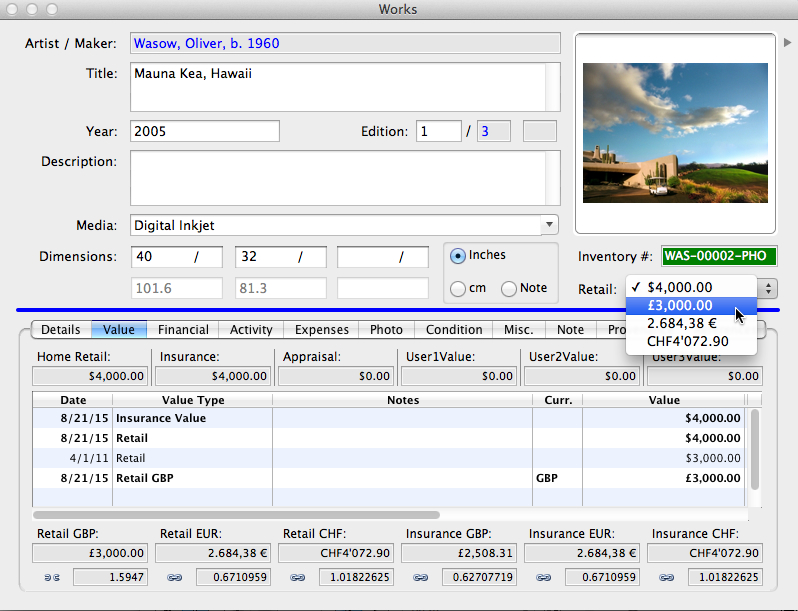
- Alternate Currency Value Tracking. Link and view up to six (6) alternate (foreign) currencies based on conversion rates updated from the Internet or rates defined by user. Updates to current rates refresh all Alternate linked amounts. Links may be set or unlinked at any time — when entering new work, reviewing a work record, or making a transaction.
- Currency Fixed Values. On a work-by-work basis, user may fix alternate currencies to non-conversion rates, i.e.; a retail value may be set for each currency market as $10,000 or £8,000 or 7,500€ regardless of their true conversion relationship to each other. Fixed alternate values automatically populate offers and invoices made in that currency.
- Enhanced Alternate “non-home” Currency. Existing alternate “non-home” functionality now integrates with ‘Alternate Currency Value Tracking’, i.e., if work value is set as a fixed currency other than the base currency for the gallery, the linked alternate values as well as alternate currencies entered for transactions adjust to display conversion to the work’s base currency instead of the gallery’s home currency.
- Drop-down Retail Selection. User can switch between alternate currencies with a click and print price lists with mixed currencies.
- Enabling “Alternate Currency Value” displays all alternate values in Work record value section.
- Option to “Link All” alternate currencies when entering new work.
- Alternate Currency Values added to Spreadsheet view for reports.
Other improvements include:
- Major speed enhancements
- Improved financial exporting for third-party accounting packages
- New Secondary Image Report
- Enhanced Contacts Module, including ability to add phone numbers and email directly into Add-Contact Wizard
- Deeper and more advanced queries of contacts purchases and interests
- Many additional fixes and other program refinements
Pro 3.0.27:
See Pro screen capture displaying first three features listed below. For more details, please contact Support.
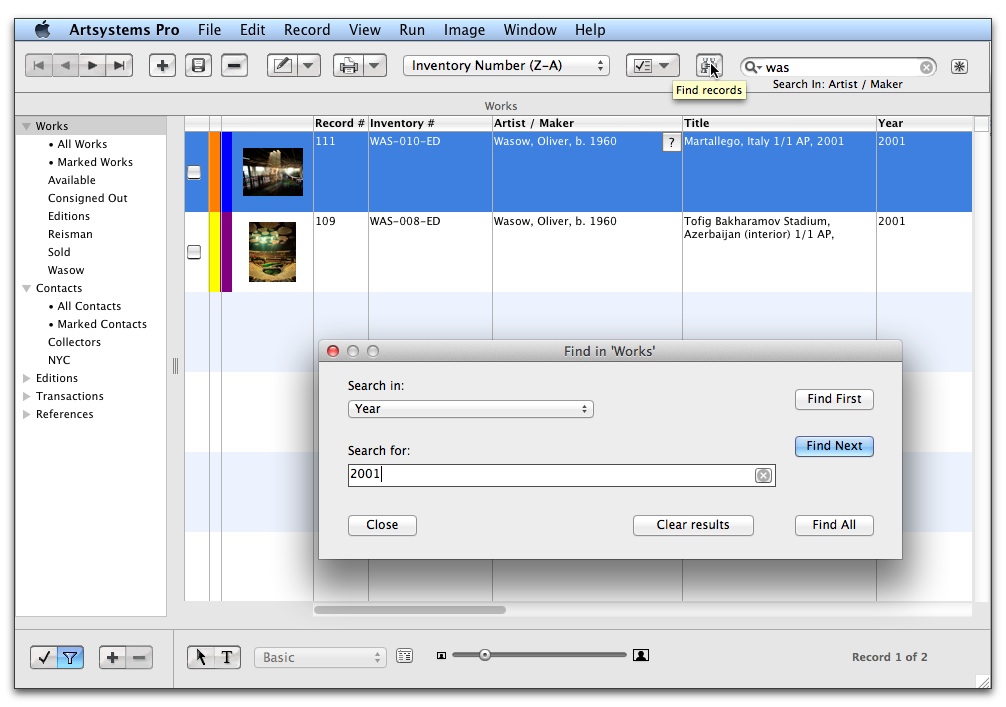
- Added an NFS (Not for Sale) check-box to Work records, designated by the color Orange. NFS Works cannot be Sold and this notation supercedes the Yellow color of any Works also ‘Out on Consignment’, ‘Loan’, etc.
- Added an ‘All Records’ selection at the top of each left-panel module list (i.e. All Works) to eliminate the need and time required to display all records of a specific module in the spreadsheet each time the module is selected.
- Added ‘Find’ button and EditFind menu item for a new Find dialog box to find First, Next or All matching records from a Detail form or the Main spreadsheet view (as in GalleryPro, click the binoculars). This works great and is very powerful when used in concert with the Search toolbar in the main header.
- Added ‘Print Image’ functionality from the Primary ‘Image form’ Detail (dbl-click on the Image on Works or Editions Detail) creating a Word document containing only the Image. Landscape or portrait orientation of the document is automatically set based on the image proportions.
- Implemented drag-drop of Excel files into the Open Document form, and subsequent opening in Excel.
- Added Financial Accounts drop-downs to the Editions form (like GalleryPro) on a new ‘Financials’ tab if Accounts Enabled. These Account values will be copied to any Works added from an Edition.
- Added the additional ‘Address Description’ column to the Contact, Shipper and Ship Destination grids in New Transaction View Set.
- Added ‘Edition Quantity’-based calculations for Edition Financials report, as was available in GalleryPro..
- Plus many additional fixes, performance enhancements, and other program refinements
Pro 3.0.26:
- Restored the ability to include concatenated Works Provenance, Exhibition, and Bibliography entries on Transaction Documents automatically.
- Added the ability to ‘Mark all contained Works’ when viewing a Transaction Detail, which will mark the Works listed on the Transaction.
- Implemented changes to allow exporting accounting data to QuickBooks Pro for Mac.
- Added a Preferences option to ‘Display Spreadsheet search results Immediately’ to enable/disable the v3.0.24 searching feature on Main grid.
- Added the ability to Print from the Edit Related Lists window all available lists
- Added the Works ‘Original Net’, ‘Original Cost’, ‘Calculated Net’ and ‘Due to Consignor’ to the Main grid Complete layout and Works Export list.
- Added ‘Image path’ to the Editions Export list.
- Many additional fixes and other program refinements.
For more details, please contact Support.
Pro 3.0.24:
- Enhanced Search/Filter tool displays results while typing
- Alternate Work-based Currency is now available for Owned and Co-Owned Works as well as Consigned works. This feature allows accounting for a work in its own designated base currency throughout its history as may be required, rather than converting to a user’s home currency — bypassing the vagaries of currency fluctuation.
- Improved speed moving between linked Detail records in different Modules (Works to Transactions, etc.), especially in large record sets
- Implemented Artsystems CloudSync data synchronization on Windows OS as well as Macintosh.
- Many additional fixes and other program refinements
Pro 3.0.23:
- Substantial speed improvements in critical sections of the database, especially in Transactions and Contact Statistics
- Accounting export and VAT functionality refinements
- Work-based multiple currency refinements
- Added ‘right-click’ functionality on standard Edit fields for Cut, Copy and Paste
- Additional major performance improvements, specifically in record loading, navigation, searching, sorting, and scrolling.
- Many additional fixes and other program refinements
Pro 3.0.22:
- Easy-to-use advanced option to utilize work-based multiple-currency accounting
- New ‘reverse sort’ option on all sort order selections in toolbar (Z-A)
- Report and Document image display improvements
- Accounting export refinements
- VAT Accounting refinements
- Security feature refinements
- Additional fixes and program refinements
Pro 3.0.21:
- Implemented QuickBooks Pro/Premier .iif export file functionality.
- Implemented emailing to selected group of Contacts directly from Pro.
- Additional fixes and program refinements.
Pro 3.0.20:
- Implemented VAT entry fields and accounting calculations in Transactions, Works, Contacts and Edit Related Lists with selection of ‘VAT’ in App Preferences Transactions module. Includes new Invoice, Cash Sale, Offer and Credit Memo document templates for Standard and Margin schemes.
- Implemented generic Accounting export functionality on Financial Reports form and inclusion of Chart of Account entry dropdowns on Works, Transactions and Edit Related Lists with selection of ‘Show Accounts’ in App Preferences Transactions module.
- Added ‘Sales/Cost of Sales’, ‘Top Sales’, and ‘Sales Tax’ Financial reports, including a variation of ‘Sales/Cost of Sales VAT’ to include columns & totals for VAT when enabled.
- Additional fixes and program refinements.
ProFile 2.5.5:
- Fixed display issue for Work Information tab where User-defined Auxiliary data fields were not displaying if there was also text for Work Description field.
ProFile 2.5.4:
- Fixed issue with Dimension Notes display.
ProFile 2.5.3:
- Improved Dimensions display
- Optimized for larger iPad Pro displays
ProFile 2.5.2:
- New ability to change works display order on the fly within Artist records (sort by Title, Inventory Number, or Year).
- New expanded Dimensions display can include Auxiliary Dimensions field.
- New: Auxiliary Dimensions and Dimension Notes now included in Work captions in emails.
ProFile 2.51:
- iOS 11+ compatible
ProFile 2.5:
- Option to include secondary images for works in multiple-work emails
- Redesigned works lists for improved readability (iPad)
- Improved inline display of very long or very wide images within emails
- Allowance for display of multiple currencies (current users must contact ProFile support for activation and re-import works)
- iOS 10.1+ compatible
ProFile 2.4:
- Allows for additional separately uploaded image file to be the Feature image representing an Artist, Exhibition, or Selection instead of assigning a Work Record
- New hierarchical Artist Info section within each Artist record that displays associated links for Exhibitions, Selections, News items, Press articles, attached Press PDF files, and attached website Press Release PDF files
- Compatible with iOS 10
ProFile 2.2:
- User-assigned app password prevents unauthorized app launch (optional)
- Layout additionally optimized for iPad Pro display, including additional thumbnail images per row/column
- Faster data download
- Faster scrolling
- Ability to include artist name only as ‘first name’
- General fixes
Note: if after updating, the main feature images for Exhibitions and/or Selections are not displaying, please tap ‘Reset’ in the ProFile settings (the gear icon in the upper right) to download all data/images.
ProFile 2.1:
- Images download up to 4 times faster
- Additional performance enhancements
- Keyword Search and Advance Search results expanded to allow for viewing and browsing results as a group with all current views and functionality
- Ability to customize sort order for Artist’s Works
- New ‘Reset’ feature allows downloading full data without app reinstall
- New ‘Network Connection Required’ prompt alerts user if Internet is not available before attempting Refresh or Reset
ProFile 2.0.1:
- Optimized for iOS 9
- Performance enhancements
- General fixes
ProFile 2.0:
- Support for iPhone and iPod Touch
ProFile 1.9.1:
- Improved Search interface
- Improved Search performance
- Streamlined preferences and email settings display
ProFile 1.9:
- Keyword and Advanced Search: Instantly locate individual records or filter lists of records based on keywords or combinations of field-based parameters such as: Artist, Title, Year, Media, Inventory Number, Type, Categories, Location, Source, and any of the 12 user-assigned Auxiliary Fields.
- Select multiple search criteria for each field (such as multiple Locations, work Types, and/or Artists), if desired
- Select multiple records from search results for emailing
- Security features are applied to search criteria and search results
- Fixed: An Exhibition can now appear even if no works are included
ProFile 1.8:
- Requires improved performance of iOS 8
- Up to 30% faster downloads
- Requires up to 50% less storage space — add twice the works
- Smoother and faster-loading user interface
ProFile 1.7.1:
See 1.7 below for instructions regarding updating from versions earlier than 1.7.
- Bug fixes
ProFile 1.7:
- New App name: ProFile
Note: Please contact Artsystems Support before updating to this version. Due to database structural changes, you must delete/reinstall the app and re-download the app data via WiFi to the Internet. Please confirm security key with Artsystems Support before updating.
- New App name: ProFile
- Turn on/off work caption display within image thumbnail grid with tap of caption icon
- Ability to add secondary images for each work
- Additional grid/detail views for works’ secondary images
- Option to include works’ secondary images in emails
- Ability to sort secondary-image display within Content Management System (CMS)
- Work thumbnail image now displays in Document View.
- Document View added to work by default (allows for longer titles to display)
- Work PDF added to Document View
- iOS 8 compatible
iPad App 1.6:
Note: v1.6.1 and 1.6.2 included no changes to App
- Updated iOS 7 user interface
- Improved speed for large collections
- Custom email user greeting can be defined in App
- Custom email signature can be defined in App
- Add PDFs of work information to each work — view in App
- Artist and Work PDF attachments can be sent in email
- Thumbnail work image included in Infosheet view
- Ability to launch online Content Management System (CMS) from App restored
- Various minor bug fixes
iPad App 1.5:
- New arrow navigation control for navigating large record counts.
iPad App 1.4.1:
- Email signature added again to detail emails
- Admin “update”‘ wording changed to “refresh” to avoid confusion with application updates
- Launch Admin link temporarily removed from settings
iPad App 1.4:
- Add PDFs of Artist CVs and Exhibition information — view in App
- Attach PDFs to emails and send singly or choose option to send automatically along with selected Artists’ works
- Addition of six importable artwork detail fields (12 total), viewable on optionally password-protected additional detail page
- Web links now display in red on black background, in blue on white background
iPad App 1.3.1:
- Updated Sample Database to illustrate new features and fix new email display issues
- Adjusted position of Work Status Display indicators (red and pink dots)
iPad App 1.3:
- Displays ‘Sold’ and ‘Reserved’ indicators (red and pink dots) for Works in detail view, lists, and thumbnail grids
- Works module thumbnail grid
- Optional Password Security on display options for Price, Availability, and Additional Work Details page
- Ability to add multiple works to an email from any module, not just from Works
- Ability to swipe directly between Works in full-screen view
- Ability to assign Works to display only in Exhibitions or Selections and be hidden from Artists and Works modules
- iOS 7 display issues fixed
- Clicking rows behind email popover buttons no longer errantly highlights row
- Popover positioning fixed
iPad App 1.2:
- Faster and more stable, even with thousands of works
- Multiple-Works Email function — Select and email works from Works tab
- Additional Work Details page for each work includes description field, dimension notes, up to five user defined fields for importable data such as ‘Location’, ‘Source’ or any other defined field
- Clicking thumbnail images gives ‘button’ response interactivity
- ‘Hide from App’ functionality — Hide records in Admin to hide them on the iPad
- Artist/Exhibitions/Selections Info and Additional Work Details buttons now appear only when associated data is present
- Corrected refresh issues related to change of orientation
- Corrected single work email popover positioning’
- Corrected several sorting issues related to artist and work names that contained unusual characters
iPad App 1.1.1:
- Fixes a sorting issue when nonchalance characters are used in Work titles
iPad App 1.1:
- New partial update features lets you transfer only updated/new works from the Online Admin to the iPad
- Improved email features
- Improved stability and UI (User Interface) responsiveness
- Handles large numbers of records
- New Artist Index in Works Module
- Improved feedback during launch and download process
iPad App 1.0.3:
- Stability improvements
iPad App 1.0.2:
- Inventory Number no longer required for work to appear in App
- Fixed issue where Year may not refresh properly after updating a record in the Online Admin
- Fixed cosmetic issues where superfluous commas appeared in Works Detail and List Views when Year was absent
iPad App 1.0.1:
- Fixed App Icon
iPad App 1.0:
- Posted Sep 14, 2012