Quality
Leadership
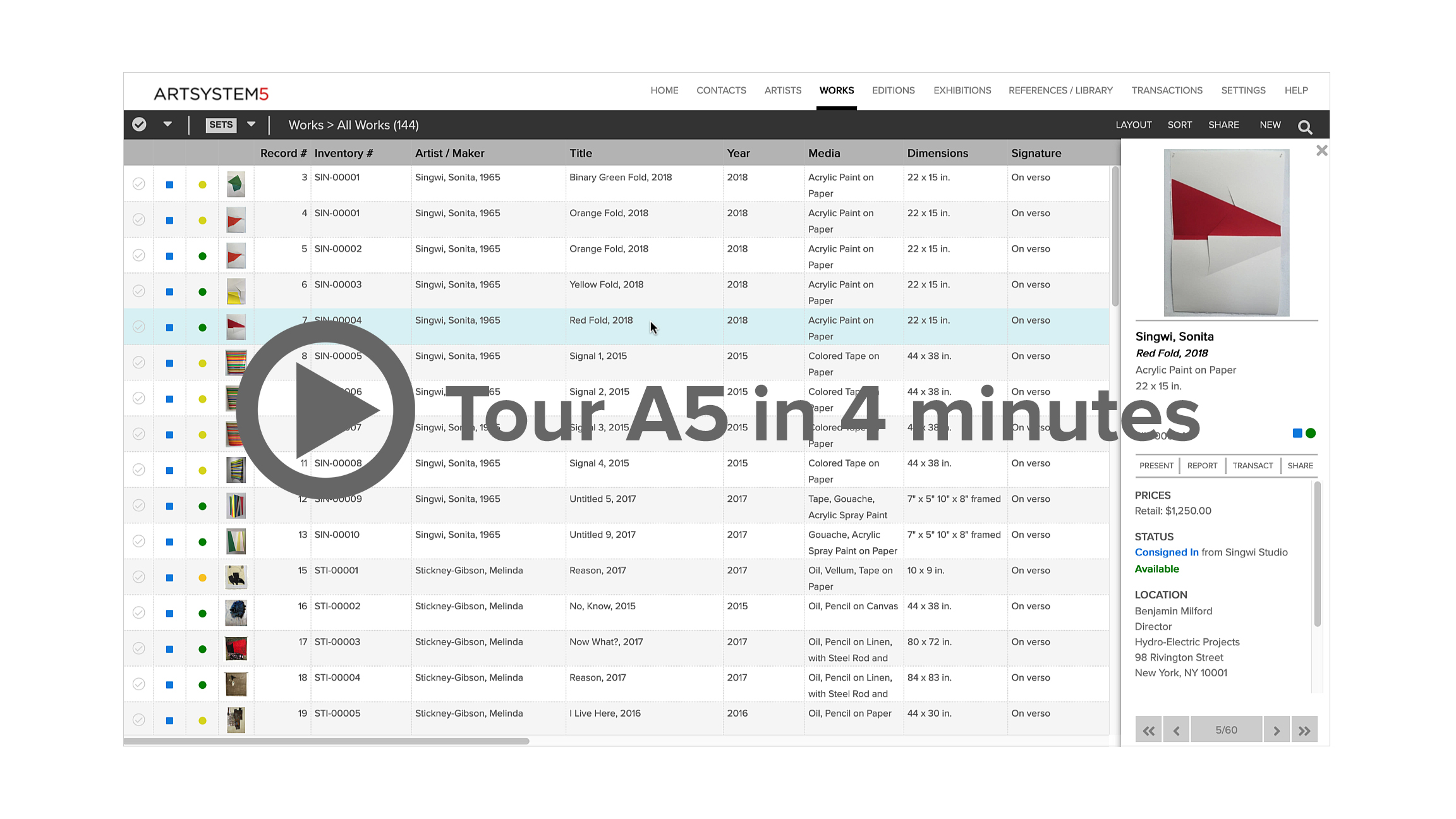
Artsystems business and collection management software has been implemented by most of the galleries and private collections in the U.S. and Canada who have implemented such a system, and many leading galleries and collections overseas. Artsystems' clients save the most time and make the most sales. A look at Artsystems client list shows we're #1 with the top galleries.
Business Expertise
Our software systems have been developed and continually upgraded over 17 years in a constant collaboration with Artsystems' industry-leading client-partners. Many of the secrets of Artsystems clients' business success have been distilled and systematized to create an application to generate sales and increase efficiency with the industry's 'best practices'. As Warhol said, 'Good business is the best art.' In fact, it has been proven that Artsystems Software can help you save over 90% of the time previously spent on gallery tasks. Our staff of gallery veterans — ready to help — has more than three centuries of art and antiques management experience.
Industry Standards
The use of a standard program for your business or collection means that your system will continue to grow and evolve. Custom system users are locked into the last set of changes provided to them by the developer, while Artsystems customers can always benefit from the latest new features. Artsystems provides custom reports and user-definable fields, but the basic program is the same standard program that all of our world-class businesses use. And because the system is not 'home-made', it is tried and true and proven.
Also, the pool of trained users and potential hires is much larger. Besides having by far the largest customer base, Artsystems software is taught at leading arts administration programs such as the Sotheby's Institute and FIT's graduate school. Businesses and collections utilizing Artsystems have the advantage of the 'network effect' and exchange data with partners, artists and collectors in the large Artsystems client network. In fact the Internal Revenue Service selected Artsystems on the basis of it being the industry standard, and uses it to manage its appraisal work. Ask your colleagues what system they use. The odds are it's Artsystems GalleryPro, Collections, or Studio.
(top)
Technology
Unlike its imitators, Artsystems software packages are not 'home-made' systems. They are real built-from-the-ground-up software applications that rely on the up-to-date technology of the Visual Basic programming languages to provide enhanced performance and unlimited integration capabilities with third party imaging, communication, accounting, and Internet applications. Our applications are not limited by the narrow range of features that can be programmed within an application such as Access (which has inherent 'record-locking' problems) or Filemaker Pro (which, as our competitors use it, is a very inefficient database, saving data as 'text' rather than 'binary'). Our systems use database software only for its strength — as the database engine.
(top)
Reliability
Since 1989 Artsystems has exclusively served only the art and antiques industries. While most of our competitors either have abandoned their gallery management systems, depend mainly on unrelated products, or send clients elsewhere for expensive third-party technical support, Artsystems has continually reaffirmed its commitment to product and service leadership. This is what we know and we know it well — Artsystems' 15-person staff of gallery veterans has an average of 20 years in the art and antiques industries, many years of experience with our programs before working at the company, and many years since. Need help? The staff is available continually during business hours to support your use of Artsystems software. The one or two-person support staffs of the competition can't measure up.
(top)
Comprehensiveness
Every art and antiques information task can be accomplished with Artsystems software. Once any information is entered, it never has to be entered again. From shipping receipts to publication references to Web sites to invoices to the bottom line — everything is automated and everything is covered. And with our fully relational database, all information automatically cross-links and updates. Entered wrong? Fix it one place, and every place is updated. With other systems, this won't happen.
(top)
Automation
From automatic inventory numbers based on user-defined codes, to global updating of all details — including exact locations of artworks and client balances — Artsystems software has incomparable capabilities for automating your business or collection. Add client or artwork information on the fly as you make a sale. Move works and update locations remotely with our integrated wireless barcode tracking software. Automatically save complicated queries such as 'all available consigned landscape paintings less than $2,000 and less than 40 inches high,' view this list as a spreadsheet and create labels automatically. Save that criteria or specific group of works and recall another time with one click! Send invoice, cash sale, and payment details to QuickBooks Pro accounts. Renew the content of your Web site with a few clicks. Create reports with images and save their formats through comprehensive spreadsheet views. Artsystems' competition cannot do any of this!
(top)
Flexibility
With Artsystems Software you can attach up to eleven images to each artwork record and enter unlimited addresses for each contact. 33 user-definable fields allow you to track all the information you want (in the unlikely event that Artsystems Software does not already track it), and you can set system preferences, including field-by-field read-write security, to utilize Artsystems Software just the way your business operates.
(top)
Integration
Artsystems Software doesn't just export information to software you already use — it actually integrates it.
- Microsoft Outlook: Email news to an automatically generated list of contacts who purchased an artists work. Save that email in the contacts' records along with copies of past letters and faxes. Set an Outlook 'task' to follow up with a contact simply by clicking an icon in Artsystems Software.
- Microsoft Word: If you like, use as your default word processor for Artsystems Software reports and transaction documents. Either way, you can edit or add info to reports directly on screen — unlike our Filemaker Pro-based competition.
- QuickBooks Pro: Link for a truly integrated general ledger solution, posting client and detailed cost and sales account information (including payments) by individual invoice or payment receipt from GalleryPro — no more double entry. Or, if you prefer, manage payables and receivables only in GalleryPro. You have the option.
- Web sites: Add the Artsystems Web Manager and manage your entire site from within Artsystems software — searchable artwork data and images, exhibitions, news, home page, bios and press releases. Other systems do not have this complete capability.
(top)
Networkability
Artsystems software allows importing and exporting of object data and images with other businesses, collectors and artists using Artsystems software
— no retyping! Artsystems client network is broad and international — on six continents, not centered in a single regional area. Artsystems software runs great on peer-to-peer and client/server networks, as well as over remote networks using Windows Terminal Services or Citrix, and on both PCs and Macs.
(top)
Ease of Use
Artsystems software has been designed to employ standard protocols, making it familiar and easy to use from day one. The interface is clean, elegant and neutral — no goofy icons or cheesy-looking reports. It comes with a newly revised comprehensive user guide written by veteran gallery staff. Training isn't necessary, but is useful and available — on-site, in our office, or online on your computer via telephone and Webex, individually or in groups.
(top)
Affordability
Artsystems software, with all of its advantages, costs no more (and often much less) than the competition. In fact, it is very affordable and quickly pays for itself in saved time and increased sales. A single GalleryPro computer license with five years worth of technical support costs less than 50¢ per hour — and delivers priceless labor-saving efficiency and reliable consistency for years on end.
(top)
Security
Artsystems software users have the ability to limit field-by-field read/write access to sensitive data by individual and group (defined by the user). Filemaker Pro-based software does not have this capability.
(top)
.
|